Account & login
Email alerts for your customers
Keep a shipper updated automatically — the four events, and what each state in the Alerts column means.
You can have Traqo email your customer directly when their cargo moves, so you are not forwarding updates by hand. It is set per customer, under Customers.
The four events
- Departed — the vessel has left the origin port.
- Arrived — it has berthed at destination.
- ETA changed — the carrier moved the arrival date.
- Free days ending — detention or demurrage is about to start costing money. Usually the one that earns the most thanks.
Each is switched independently, so a customer who only wants arrival notices gets only those.
Reading the Alerts column
The customer list shows a state per customer rather than a bare on/off, because the states that need attention are exactly the ones an on/off would hide.
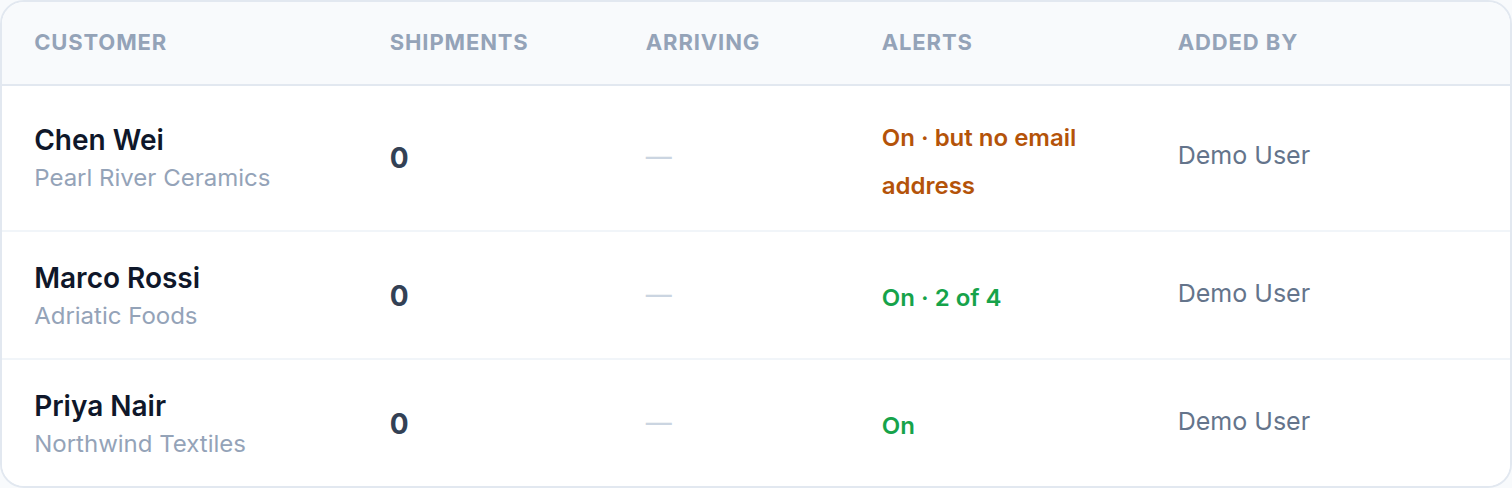
- On — all four events, and there is an address to send to.
- On · 2 of 4 — some events are switched off. The count tells you before you go looking.
- On · but no email address — shown in amber, and the one to act on. Alerts are enabled but the customer has no contact email, so nothing can be sent. It looks configured and delivers nothing. Add a contact email to fix it.
- Off · no updates sent — deliberately silent.
- Unsubscribed by customer — they used the unsubscribe link in one of our emails.
- Opted out of shared links — they stopped the emails that come from a shared tracking link. Vendors can be in this state too, though vendors never receive event alerts.
When a customer unsubscribes
Every alert email carries a one-click unsubscribe. Using it switches off all four events for that customer at once — no login, no reply, no confirmation step. It is deliberately that easy: a customer who cannot stop the emails marks them as spam instead, and that damages delivery for everyone on your account.
You can re-enable alerts for them from the dashboard, but ask first. The unsubscribe was their decision.
Before you switch alerts on
Check the contact email is the person who actually wants the updates — often the customer's logistics coordinator rather than the address on the invoice. A shipment that changes ETA three times sends three emails, and sending those to the wrong person is how an account ends up unsubscribed.
Was this helpful?